

Introduction
In ROS 2, parameters are a powerful way to configure nodes at launch or at runtime without the need to modify and recompile code. This tutorial will guide you through the process of using parameters to customize the behavior of your ROS 2 nodes.
What ROS 2 parameters are
A parameter is a named configuration value associated with a single node; each node maintains its own parameter store, and there is no global parameter server as in ROS 1. Parameters are typed, and their values are accessed via the node’s parameter services, which are generated from the rcl_interfaces package.
Typical use cases include topic QoS selection, controller gains, robot names, frame IDs, and enabling or disabling features at launch time instead of recompiling. Parameters can be declared with default values in code, overridden from the command line, or loaded from YAML files.
Listing and inspecting node parameters
The main CLI entry point is ros2 param, which talks to the node’s parameter services via the RMW communication middleware.
Discovering parameters
-
List parameters of a specific node:
ros2 param list /my_node -
List parameters on all discoverable nodes (can be slow on large systems):
ros2 param list
The output is a flat list of parameter names (including nested ones expressed with dots) grouped by node. For example, a node might expose parameters like use_sim_time, camera.fps, and camera.resolution.width.
For example, you can retrieve the parameters of the “talker” node of the “talker/listener” demo with:
$ ros2 param list
/talker:
    qos_overrides./parameter_events.publisher.depth
    qos_overrides./parameter_events.publisher.durability
    qos_overrides./parameter_events.publisher.history
    qos_overrides./parameter_events.publisher.reliability
    start_type_description_service
    use_sim_time
 Note: here comes again the name “QoS” as
 qos_overrides. This is a concept that we will analyze in a later important tutorial.
Reading parameter values and types
-
Get a single parameter value:
ros2 param get /my_node param_name -
Get multiple parameters via the underlying services:
ros2 interface show rcl_interfaces/srv/GetParametersgives the exact service structure used to retrieve them.
The get command prints both the type and the value (for example, Boolean value is: True), which is useful when you are debugging or preparing a YAML file.
For more advanced inspection, you can work directly with the parameter services (GetParameters, DescribeParameters, ListParameters, etc.) from scripts or tools.
An example using the “Talker” node of the “talker/listener” demo:
$ ros2 param get /talker use_sim_time
Boolean value is: False
Setting parameters from the CLI
You can set parameters in two main contexts: at startup and at runtime.
Setting parameters at node startup
When launching a node manually, parameters can be passed on the command line with --ros-args and -p:
-
Single parameter:
ros2 run my_pkg my_node --ros-args -p param_name:=new_param_value -
Multiple parameters:
ros2 run my_pkg my_node --ros-args -p param_name:=new_param_value_1 -p param_name_2:=new_param_value_2 -p param_name_3:=new_param_value_3
The CLI infers the type from the literal value: numeric tokens become integers or doubles, true/false become booleans, and quoted strings remain strings. Arrays are supported using YAML-like list syntax, such as -p array_param:="[val_1, val_2, val_3]".
Changing parameters at runtime
-
Set a parameter while the node is running:
ros2 param set /my_node param_name param_value -
The new value must be compatible with the existing type; otherwise, the service returns an error and the parameter does not change.
Under the hood, ros2 param set calls the SetParameters service, which takes a list of Parameter messages and returns a list of SetParametersResult flags indicating success or failure for each entry. For batch operations and tooling, you can call SetParameters or SetParametersAtomically directly from Python or C++.
Using the rqt GUI
The rqt framework provides a graphical interface for managing ROS 2 parameters. You can use the Dynamic Reconfigure plugin to visualize and modify parameters in real time. You can open the plugin interface from the Plugins -> Configure -> Dynamic Reconfigure menu.
If the plugin is not available you can install it as:
sudo apt install ros-<distro>-rqt-reconfigure
and use the command
rqt --force-discover
to launch the rqt GUI forcing a new discovery of the available plugins.
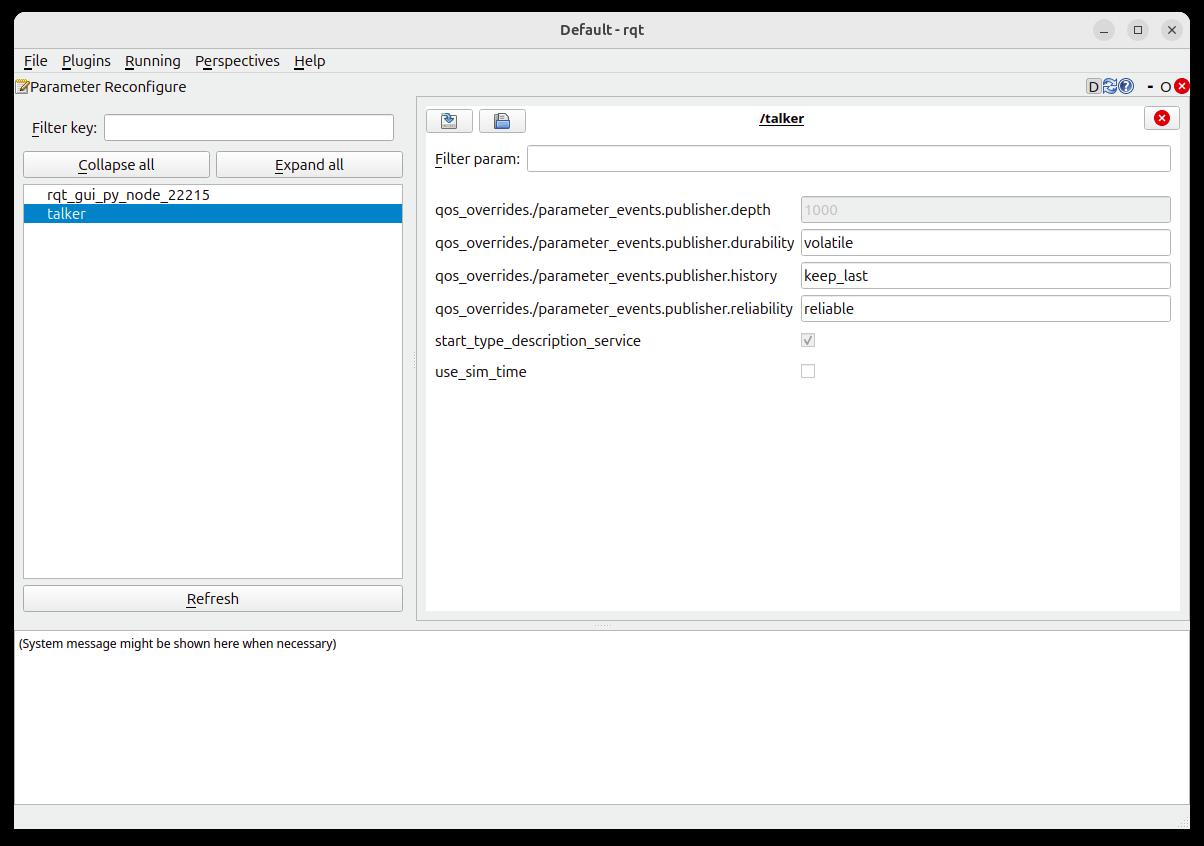
Note: The parameters that are not declared as “dynamic” in the node’s code are grayed out and not editable.
The GUI allows you to export the parameters to a YAML file and use it to set your default values for the node at startup, as described below.
Managing parameters with YAML files
YAML configuration files are the standard way to manage large sets of parameters and keep them version-controlled. ROS 2 defines a specific structure that associates parameters with node names and the ros__parameters key.
YAML structure for a single node
A minimal YAML file for a node looks like this:
node_name:
    ros__parameters:
        param_name_1: param_value_1
        param_name_2: param_value_2
        param_name_3: param_value_3

        param_group_1:
            param_name_4: param_value_4
            param_name_5: param_value_5
            param_name_6: param_value_6

        param_group_2:
            param_name_7: param_value_7

            param_subgroup_1:
                param_name_8: param_value_8
                param_name_9: param_value_9
You first specify the node name (node_name), then the ros__parameters key, and finally all parameters belonging to that node. Nested dictionaries map to dot-separated parameter names like param_group_n on the wire.
For example, to set all the parameters of the Talker node from the Talker/Listener demo:
talker:
    ros__parameters:
        qos_overrides:
                /clock:
                        subscription:
                                depth: 1
                        durability: volatile
                        history: keep_last
                        reliability: best_effort
                /parameter_events:
                        publisher:
                                depth: 1000
                                durability: volatile
                                history: keep_last
                                reliability: reliable
        start_type_description_service: true
        use_sim_time: false
Loading YAML parameters from the command line
You can start a node with all parameters from a YAML file using --params-file:
ros2 run my_pkg my_node \
    --ros-args --params-file /path/to/params.yaml
This single command loads all parameters defined for the node in that YAML file, whether there is one parameter or hundreds. It is the recommended approach when you need to deploy the same node with different configurations across multiple robots or environments.
YAML and launch files
Although examples vary by distro, the same --params-file mechanism is typically wired into Python launch files with parameters=[path_to_yaml] or equivalent constructs. Migrating ROS 1 YAML files requires adding node names and the ros__parameters key, but the basic YAML syntax remains the same.
This approach will be analyzed in more detail in a future tutorial dedicated to Python launch files.
Dynamic parameters and callbacks
In ROS 2, parameters are inherently dynamic in the sense that they can be changed at runtime via services, without a separate “dynamic reconfigure” framework, as ROS 1 users had. However, your node must explicitly react to these changes if you want updated values to affect its internal behavior.
Dynamic updates via parameter services
Every node exposes a set of parameter-related services:
-
rcl_interfaces/srv/SetParametersto set one or more parameters. -
rcl_interfaces/srv/SetParametersAtomicallyto set parameters in an all-or-nothing transaction. -
rcl_interfaces/srv/GetParameters,DescribeParameters,ListParameters, andGetParameterTypesto introspect parameters.
Tools can call these services directly to manipulate parameter values at runtime, which is especially useful for dashboards, tuning GUIs, or automated experiments.
Parameter callbacks (rclcpp)
For C++ nodes, you can register a parameter callback to be notified whenever a parameter change is requested. Inside this callback, you validate the proposed values and either accept or reject them by returning SetParametersResult structs.
A typical pattern is:
- Register a callback with
add_on_set_parameters_callbackon the node. - For each proposed parameter, check its name, type, and value range; if invalid, set
result.successful = falseand provide a reason. - If valid, update your internal state (for example, PID gains or max speed) so the node’s behavior changes immediately.
This mechanism is the ROS 2 equivalent of ROS 1’s dynamic reconfigure, but it is integrated directly with the parameter system and services. As a best practice, you should thoroughly validate parameter updates in the callback to avoid inconsistent state when a bad value is proposed.
You can find an example of this pattern in the ZED-ROS2-Wrapper package that I contributed to.
Conclusion
In this tutorial, we explored how to manage parameters in ROS 2 using YAML files, command-line tools, and dynamic updates via services and callbacks. By leveraging these techniques, you can create flexible and configurable nodes that adapt to different environments and requirements.