
Introduction
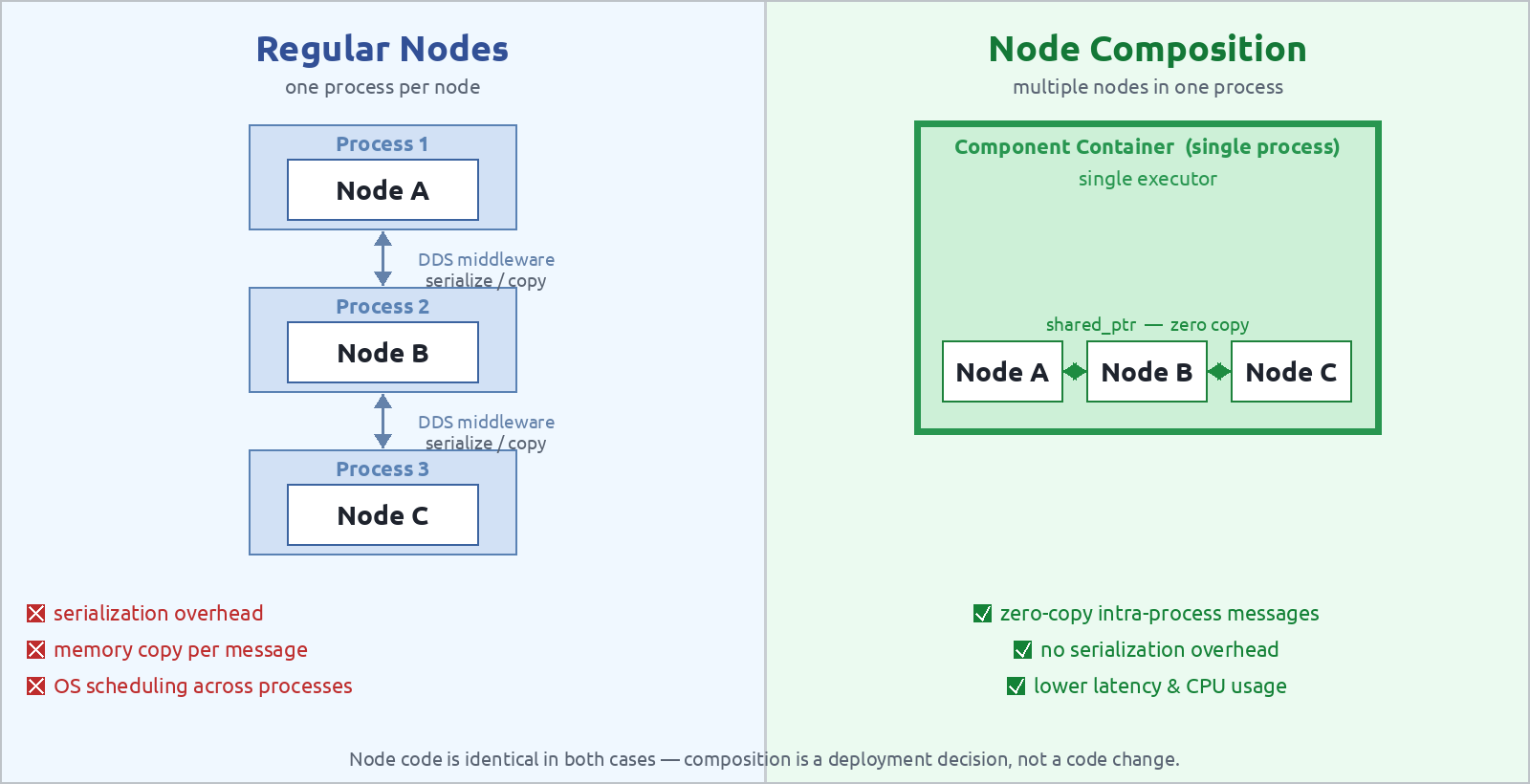
In the previous tutorials we have seen how to start ROS 2 nodes as standalone processes using ros2 run and how to manage them with launch files. By default, each node lives in its own operating system process. This is simple and safe, a crash in one node does not affect the others, but it comes with a cost: every message exchanged between nodes must be serialized, copied through the DDS middleware, and deserialized on the other side, even when both nodes run on the same machine.
Node Composition is a ROS 2 mechanism that lets you load multiple nodes into a single process, called a component container, while keeping each node’s code fully independent. When two composed nodes exchange messages within the same container, ROS 2 can use intra-process communication, which skips serialization entirely and passes a raw pointer. The result is lower latency, less CPU usage, and reduced memory bandwidth, which is especially valuable in perception pipelines where large sensor data (images, point clouds) flows between nodes at high frequency.
By the end of this tutorial you will be able to:
- Understand what a composable node is and how it differs from a regular node.
- Create a composable node plugin in C++ using
rclcpp_components. - Load nodes into a component container from the command line.
- Configure composition in a Python launch file.
- Create a Static Composition executable in C++.
- Enable zero-copy intra-process communication between composed nodes.
Prerequisites
- ROS 2 installed, follow my Installing ROS 2 tutorial if needed.
- Familiarity with ROS 2 nodes, review Starting ROS 2 Nodes and ROS 2 Python launch file explained.
- Basic C++ knowledge, composable nodes are written in C++.
What is a Composable Node?
A regular ROS 2 node compiled as an executable has a main() function that creates the node, spins it, and exits. The node is tightly coupled to its process.
A composable node (also called a component) is a node packaged as a shared library plugin instead of a standalone executable. It exposes a registration macro that the ROS 2 component system uses to load it at runtime into any compatible container process.
The key difference is:
| Regular node | Composable node | |
|---|---|---|
| Packaging | Executable (binary) | Shared library (.so) |
| Loading | One process per node | Many nodes per process |
| Communication | DDS middleware (IPC or network) | Can use intra-process (zero-copy) |
| Isolation | Full process isolation | Shared process space |
| Startup | ros2 run |
ros2 component load or launch file |
Note: composable nodes are a C++ feature provided by the
rclcpp_componentspackage. Python nodes cannot currently be loaded as composable components.
Creating a Composable Node
Package setup
A composable node lives in a normal ROS 2 C++ package. The only additions are:
- A dependency on
rclcpp_componentsinpackage.xmlandCMakeLists.txt. - The
RCLCPP_COMPONENTS_REGISTER_NODEmacro in the source file. - A CMake call to
rclcpp_components_register_node(orrclcpp_components_register_nodesfor older setups) to generate the plugin metadata.
Create a package named composition_demo:
cd ~/ros2_ws/src
ros2 pkg create --build-type ament_cmake composition_demo \
    --dependencies rclcpp rclcpp_components std_msgs
Writing the composable node
The examples below implement a TalkerComponent that publishes a string message on a timer and a ListenerComponent that subscribes to it, the same pair used throughout this tutorial, so you can focus on the composition mechanics rather than the node logic.
Create src/talker_component.cpp:
#include <chrono>
#include <memory>

#include "rclcpp/rclcpp.hpp"
#include "rclcpp_components/register_node_macro.hpp"
#include "std_msgs/msg/string.hpp"

using namespace std::chrono_literals;

namespace composition_demo
{

class TalkerComponent : public rclcpp::Node
{
public:
  explicit TalkerComponent(const rclcpp::NodeOptions & options)
  : Node("talker", options), count_(0)
  {
    // Declare parameter with default value of 2.0 Hz
    this->declare_parameter<double>("publish_rate", 2.0);
    const double rate_hz = this->get_parameter("publish_rate").as_double();
    const auto period = std::chrono::duration<double>(1.0 / rate_hz);

    pub_ = create_publisher<std_msgs::msg::String>("chatter", 10);
    timer_ = create_wall_timer(
      period, [this]() {
        auto msg = std_msgs::msg::String();
        msg.data = "Hello World: " + std::to_string(count_++);
        RCLCPP_INFO(get_logger(), "Publishing: '%s'", msg.data.c_str());
        pub_->publish(std::move(msg));
      });
  }

private:
  rclcpp::Publisher<std_msgs::msg::String>::SharedPtr pub_;
  rclcpp::TimerBase::SharedPtr timer_;
  size_t count_;
};

}  // namespace composition_demo

RCLCPP_COMPONENTS_REGISTER_NODE(composition_demo::TalkerComponent)
Then create src/listener_component.cpp:
#include <memory>

#include "rclcpp/rclcpp.hpp"
#include "rclcpp_components/register_node_macro.hpp"
#include "std_msgs/msg/string.hpp"

namespace composition_demo
{

class ListenerComponent : public rclcpp::Node
{
public:
  explicit ListenerComponent(const rclcpp::NodeOptions & options)
  : Node("listener", options)
  {
    sub_ = create_subscription<std_msgs::msg::String>(
      "chatter", 10,
      [this](const std_msgs::msg::String::SharedPtr msg) {
        RCLCPP_INFO(get_logger(), "I heard: '%s'", msg->data.c_str());
      });
  }

private:
  rclcpp::Subscription<std_msgs::msg::String>::SharedPtr sub_;
};

}  // namespace composition_demo

RCLCPP_COMPONENTS_REGISTER_NODE(composition_demo::ListenerComponent)
A few things to note:
- The constructor takes a
const rclcpp::NodeOptions &argument, this is mandatory for composable nodes. - There is no
main()function. -
RCLCPP_COMPONENTS_REGISTER_NODEregisters the class with the ROS 2 plugin system using the fully qualified class name as the component type name.
CMakeLists.txt
Update CMakeLists.txt to build shared libraries and register the components:
cmake_minimum_required(VERSION 3.8)
project(composition_demo)

find_package(ament_cmake REQUIRED)
find_package(rclcpp REQUIRED)
find_package(rclcpp_components REQUIRED)
find_package(std_msgs REQUIRED)

# Build each component as a shared library
add_library(talker_component SHARED src/talker_component.cpp)
add_library(listener_component SHARED src/listener_component.cpp)

ament_target_dependencies(talker_component rclcpp rclcpp_components std_msgs)
ament_target_dependencies(listener_component rclcpp rclcpp_components std_msgs)

# Register components, generates the plugin XML and installs it
rclcpp_components_register_node(
  talker_component
  PLUGIN "composition_demo::TalkerComponent"
  EXECUTABLE talker_node
)
rclcpp_components_register_node(
  listener_component
  PLUGIN "composition_demo::ListenerComponent"
  EXECUTABLE listener_node
)

install(TARGETS talker_component listener_component
  ARCHIVE DESTINATION lib
  LIBRARY DESTINATION lib
  RUNTIME DESTINATION bin
)

ament_package()
rclcpp_components_register_node does two things: it generates a standalone executable (named by the EXECUTABLE argument) so the component can still be used with ros2 run without a container, and it produces the plugin XML that tells the component container how to load the shared library.
Build the package:
cd ~/ros2_ws
colcon build --packages-select composition_demo
source install/setup.bash
Component Containers
A component container is a process whose sole purpose is to host composable nodes. It owns an executor and exposes a service interface that the component manager uses to load and unload plugins at runtime. ROS 2 ships with three built-in containers, each differing in how callbacks from the loaded nodes are scheduled:
| Container executable | Executor | Best for |
|---|---|---|
component_container |
Single-threaded | Sequential pipelines, simplest to reason about |
component_container_mt |
Multi-threaded | Concurrent callbacks, I/O-bound nodes |
component_container_isolated |
One thread per component | Mixed real-time / non-real-time nodes |
component_container, single-threaded executor
This is the default container. All callbacks from every loaded node are dispatched by a single thread, one at a time. Because only one callback is ever running at a given moment, you get implicit mutual exclusion: you do not need mutexes to protect shared state inside a node.
Use this container when:
- Nodes process data in a well-defined sequential order (e.g., sensor → filter → publisher).
- Your nodes are CPU-bound and do not block (blocking one callback delays all others).
- You want the simplest mental model and the easiest debugging experience.
component_container_mtorcomponent_container_isolatedinstead.
component_container_mt, multi-threaded executor
The multi-threaded executor maintains a thread pool and dispatches callbacks from all loaded nodes concurrently. This gives higher throughput when nodes are independent and I/O-bound, but it means callbacks from different nodes, or even the same node, can run simultaneously. Any shared state must be protected with mutexes or accessed only from a single callback group.
Use this container when:
- Nodes are mostly independent and do not share data.
- Some nodes perform blocking calls (network I/O, sensor reads) that would stall a single-threaded container.
- You want to exploit multi-core hardware without splitting nodes into separate processes.
Tip: use
rclcpp::CallbackGroupwithMutuallyExclusiveorReentrantpolicies to control which callbacks are allowed to run concurrently within a node. Learn more here.
component_container_isolated, per-component thread
Each loaded component gets its own dedicated executor thread. Components are fully isolated from each other in terms of scheduling: a blocking callback in Node A cannot delay Node B, because they run on independent threads.
Use this container when:
- Nodes have very different timing requirements (e.g., a high-frequency IMU driver alongside a low-frequency planner).
- Some nodes are safety-critical or near-real-time and must not be affected by jitter from other nodes.
- You need the isolation benefits of separate processes but still want intra-process communication between the nodes.
Choosing the right container
As a rule of thumb:
- Start with
component_container; it is the easiest to reason about. - Switch to
component_container_mtif throughput is the bottleneck or if nodes perform I/O. - Switch to
component_container_isolatedwhen nodes have conflicting timing requirements or when a slow node must not jitter a fast one.
Running with the CLI
Starting a container
Open a terminal and start a container:
ros2 run rclcpp_components component_container --ros-args -r __node:=my_container
The container starts and waits for components to be loaded… with no log output.
Loading components
In a second terminal, load the talker:
ros2 component load /my_container composition_demo composition_demo::TalkerComponent
And in a third terminal, load the listener:
ros2 component load /my_container composition_demo composition_demo::ListenerComponent
You will see both nodes publishing and subscribing in the container’s output:
[INFO] [talker]: Publishing: 'Hello World: 1'
[INFO] [listener]: I heard: 'Hello World: 1'
[INFO] [talker]: Publishing: 'Hello World: 2'
[INFO] [listener]: I heard: 'Hello World: 2'
Inspecting loaded components
ros2 component list
Output:
/my_container
  1  /talker
  2  /listener
Unloading a component
ros2 component unload /my_container 2
This removes the listener from the container without stopping the container or the talker.
ros2 component load /my_container composition_demo composition_demo::TalkerComponent \
  --node-name my_talker \
  --node-namespace /demo \
  -p publish_rate:=1.0
Running with a Launch File
Using ros2 component commands is convenient for interactive debugging, but in production you will want a launch file. The launch_ros module provides two actions for this:
| Action | Description |
|---|---|
ComposableNodeContainer |
Starts a new container and optionally loads components into it |
LoadComposableNodes |
Loads components into an existing container |
All-in-one: container + nodes
The simplest pattern is to declare the container and its initial set of components together. Using the OpaqueFunction template from the Python launch file tutorial we can expose configurable arguments, here namespace and use_ipc, while keeping all construction logic in plain Python:
from launch import LaunchDescription
from launch.actions import DeclareLaunchArgument, OpaqueFunction
from launch.substitutions import LaunchConfiguration
from launch_ros.actions import ComposableNodeContainer
from launch_ros.descriptions import ComposableNode


def launch_setup(context, *args, **kwargs):
    actions = []

    namespace = LaunchConfiguration('namespace').perform(context)
    use_ipc   = LaunchConfiguration('use_ipc').perform(context).lower() == 'true'

    container = ComposableNodeContainer(
        name='demo_container',
        namespace=namespace,
        package='rclcpp_components',
        executable='component_container',
        composable_node_descriptions=[
            ComposableNode(
                package='composition_demo',
                plugin='composition_demo::TalkerComponent',
                name='talker',
                extra_arguments=[{'use_intra_process_comms': use_ipc}],
            ),
            ComposableNode(
                package='composition_demo',
                plugin='composition_demo::ListenerComponent',
                name='listener',
                extra_arguments=[{'use_intra_process_comms': use_ipc}],
            ),
        ],
        output='screen',
    )
    actions.append(container)
    return actions


def generate_launch_description():
    return LaunchDescription([
        DeclareLaunchArgument(
            'namespace',
            default_value='',
            description='Namespace for the container and its nodes'
        ),
        DeclareLaunchArgument(
            'use_ipc',
            default_value='true',
            description='Enable intra-process communication'
        ),
        OpaqueFunction(function=launch_setup),
    ])
Splitting container and nodes
When you want to load components into an already-running container, for example, a container started by another launch file, use LoadComposableNodes. The same launch_setup pattern applies: resolve the arguments first, then build both actions as plain Python objects:
from launch import LaunchDescription
from launch.actions import DeclareLaunchArgument, OpaqueFunction
from launch.substitutions import LaunchConfiguration
from launch_ros.actions import ComposableNodeContainer, LoadComposableNodes
from launch_ros.descriptions import ComposableNode


def launch_setup(context, *args, **kwargs):
    actions = []

    namespace = LaunchConfiguration('namespace').perform(context)
    use_ipc   = LaunchConfiguration('use_ipc').perform(context).lower() == 'true'
    cont_name = 'demo_container'

    # Start an empty container
    container = ComposableNodeContainer(
        name=cont_name,
        namespace=namespace,
        package='rclcpp_components',
        executable='component_container',
        composable_node_descriptions=[],
        output='screen',
    )

    # Load nodes into the container defined above
    load_nodes = LoadComposableNodes(
        target_container=cont_name,
        composable_node_descriptions=[
            ComposableNode(
                package='composition_demo',
                plugin='composition_demo::TalkerComponent',
                name='talker',
                namespace=namespace,
                extra_arguments=[{'use_intra_process_comms': use_ipc}],
            ),
            ComposableNode(
                package='composition_demo',
                plugin='composition_demo::ListenerComponent',
                name='listener',
                namespace=namespace,
                extra_arguments=[{'use_intra_process_comms': use_ipc}],
            ),
        ],
    )

    actions.append(container)
    actions.append(load_nodes)
    return actions


def generate_launch_description():
    return LaunchDescription([
        DeclareLaunchArgument(
            'namespace',
            default_value='',
            description='Namespace for the container and its nodes'
        ),
        DeclareLaunchArgument(
            'use_ipc',
            default_value='true',
            description='Enable intra-process communication'
        ),
        OpaqueFunction(function=launch_setup),
    ])
Passing parameters and remappings
ComposableNode accepts the same parameters and remappings arguments as a regular Node. Inside launch_setup, the resolved string values can be used directly:
def launch_setup(context, *args, **kwargs):
    actions = []

    namespace    = LaunchConfiguration('namespace').perform(context)
    publish_rate = float(LaunchConfiguration('publish_rate').perform(context))
    use_ipc      = LaunchConfiguration('use_ipc').perform(context).lower() == 'true'

    container = ComposableNodeContainer(
        name='demo_container',
        namespace=namespace,
        package='rclcpp_components',
        executable='component_container',
        composable_node_descriptions=[
            ComposableNode(
                package='composition_demo',
                plugin='composition_demo::TalkerComponent',
                name='talker',
                parameters=[{'publish_rate': publish_rate}],
                remappings=[('chatter', namespace + '/chatter')],
                extra_arguments=[{'use_intra_process_comms': use_ipc}],
            ),
            ComposableNode(
                package='composition_demo',
                plugin='composition_demo::ListenerComponent',
                name='listener',
                remappings=[('chatter', namespace + '/chatter')],
                extra_arguments=[{'use_intra_process_comms': use_ipc}],
            ),
        ],
        output='screen',
    )
    actions.append(container)
    return actions
Static Composition with C++
The CLI and launch file approaches use dynamic composition: the component container process is started first, and nodes are loaded into it at runtime through a service call. This is flexible, you can add or remove nodes while the system is running, but it carries a small overhead from the component manager service and the dynamic library loader.
Static composition is an alternative where you instantiate the components directly in a main() function, wire them into an executor, and compile the whole thing into a single executable. There is no container service, no runtime loading, and no ros2 component load needed. Startup is faster and the binary is self-contained.
When to use static composition
| Dynamic (container / launch file) | Static (C++ main) |
|
|---|---|---|
| Add/remove nodes at runtime | Yes | No, fixed at build time |
| Startup overhead | Component manager + service call | None |
| Binary size | Shared libraries loaded on demand | All code linked in |
| Flexibility | High | Low |
| Use case | Robots with reconfigurable pipelines | Embedded systems, fixed production deploys |
Use static composition when the set of nodes is fixed, binary size is not a concern, and you want the simplest possible deployment (a single executable, no launch file required).
Exposing the component header
By default the component source files only expose the registration macro, not the class itself. For static composition you need to #include the class, so add a header for each component.
Create include/composition_demo/talker_component.hpp:
#pragma once
#include "rclcpp/rclcpp.hpp"

namespace composition_demo
{
class TalkerComponent : public rclcpp::Node
{
public:
  explicit TalkerComponent(const rclcpp::NodeOptions & options);
private:
  rclcpp::Publisher<std_msgs::msg::String>::SharedPtr pub_;
  rclcpp::TimerBase::SharedPtr timer_;
  size_t count_;
};
}  // namespace composition_demo
And include/composition_demo/listener_component.hpp:
#pragma once
#include "rclcpp/rclcpp.hpp"

namespace composition_demo
{
class ListenerComponent : public rclcpp::Node
{
public:
  explicit ListenerComponent(const rclcpp::NodeOptions & options);
private:
  rclcpp::Subscription<std_msgs::msg::String>::SharedPtr sub_;
};
}  // namespace composition_demo
Writing the main file
Create src/static_composition_main.cpp:
#include <memory>

#include "rclcpp/rclcpp.hpp"
#include "composition_demo/talker_component.hpp"
#include "composition_demo/listener_component.hpp"

int main(int argc, char * argv[])
{
  rclcpp::init(argc, argv);

  // Enable intra-process communication for all nodes in this executable
  rclcpp::NodeOptions options;
  options.use_intra_process_comms(true);

  // Instantiate components directly, no container service needed
  auto talker   = std::make_shared<composition_demo::TalkerComponent>(options);
  auto listener = std::make_shared<composition_demo::ListenerComponent>(options);

  // Spin both nodes on a single-threaded executor
  rclcpp::executors::SingleThreadedExecutor exec;
  exec.add_node(talker);
  exec.add_node(listener);
  exec.spin();

  rclcpp::shutdown();
  return 0;
}
For a multi-threaded executor swap SingleThreadedExecutor for MultiThreadedExecutor. The rclcpp::executors namespace also provides StaticSingleThreadedExecutor, which pre-builds the callback graph at startup for even lower per-spin overhead.
CMakeLists.txt additions
Add the executable and link it against the component libraries (already built as shared libraries earlier in this tutorial):
add_executable(static_composition src/static_composition_main.cpp)
target_include_directories(static_composition PUBLIC include)
ament_target_dependencies(static_composition rclcpp rclcpp_components std_msgs)
target_link_libraries(static_composition talker_component listener_component)

install(TARGETS static_composition
  DESTINATION lib/${PROJECT_NAME}
)
After rebuilding the package you can run the composed system with a single command, no launch file, no container:
colcon build --packages-select composition_demo
source install/setup.bash
ros2 run composition_demo static_composition
RCLCPP_COMPONENTS_REGISTER_NODEmacros in the.cppfiles are still present and harmless, they register the plugin metadata for the dynamic loading path. The static executable simply ignores them and uses the class constructors directly.
Intra-Process Communication
The main performance benefit of composition is intra-process communication (IPC). When two nodes in the same process exchange messages, ROS 2 can pass ownership of the message directly via a shared pointer, bypassing the DDS middleware entirely. This eliminates serialization, deserialization, and memory copies.
To enable IPC, pass use_intra_process_comms=True in the NodeOptions when creating the container or node. In the launch files above this is driven by the use_ipc argument, which resolves to a plain Python bool inside launch_setup and is forwarded via extra_arguments. IPC can also be enabled directly in the node source code:
In the node source code
explicit TalkerComponent(const rclcpp::NodeOptions & options)
: Node("talker", rclcpp::NodeOptions(options).use_intra_process_comms(true)),
  count_(0)
{
  // ...
}
Zero-copy publishing
ROS 2 provides two mechanisms for zero-copy message passing. Both require use_intra_process_comms to be enabled on all participating nodes.
Approach 1: unique_ptr ownership transfer
The publisher allocates the message, fills it, and moves ownership into publish(). The middleware passes the pointer directly to the subscriber without any copy:
// Publisher: allocate, fill, and transfer ownership
auto msg = std::make_unique<std_msgs::msg::String>();
msg->data = "Hello World: " + std::to_string(count_++);
pub_->publish(std::move(msg));  // pointer handed off, no copy
The subscription callback must accept a UniquePtr (or SharedPtr) to receive the message without a copy:
// Subscription: take ownership of the pointer
sub_ = create_subscription<std_msgs::msg::String>(
  "chatter", 10,
  [this](std_msgs::msg::String::UniquePtr msg) {
    RCLCPP_INFO(get_logger(), "I heard: '%s'", msg->data.c_str());
  });
This is the simplest and most portable approach and works with any RMW implementation.
Approach 2: loaned messages
Some RMW implementations (e.g., Eclipse iceoryx) support loaned messages: the publisher borrows a pre-allocated slot directly from the middleware’s shared memory, fills it in place, and returns the loan on publish; no heap allocation, no copy, even across process boundaries.
// Publisher: borrow a slot from the middleware memory pool
auto loan = pub_->borrow_loaned_message();
loan.get().data = "Hello World: " + std::to_string(count_++);
pub_->publish(std::move(loan));  // slot returned to middleware, zero copy
The subscription side is unchanged, the callback still receives a SharedPtr (or UniquePtr); the RMW handles the memory mapping transparently:
sub_ = create_subscription<std_msgs::msg::String>(
  "chatter", 10,
  [this](std_msgs::msg::String::SharedPtr msg) {
    RCLCPP_INFO(get_logger(), "I heard: '%s'", msg->data.c_str());
  });
borrow_loaned_message()throwsrclcpp::exceptions::UnimplementedErrorif the active RMW does not support loans. Wrap it in atry/catchor checkpub_->can_loan_messages()before use if your code must work across multiple RMW implementations.
RMW support for loaned messages
Not all DDS middleware implementations expose the loaned messages API. The table below summarises the status for the two active LTS distributions:
| RMW package | Middleware | Humble (Humble Hawksbill) | Jazzy (Jazzy Jalisco) | Notes |
|---|---|---|---|---|
rmw_iceoryx_cpp |
Eclipse iceoryx | Yes | Yes | Full zero-copy via shared memory; the reference implementation for loans in ROS 2 |
rmw_fastrtps_cpp |
eProsima Fast DDS | No | No | Fast DDS has its own SHM transport but does not expose the ROS 2 loaned messages API through borrow_loaned_message()
|
rmw_cyclonedds_cpp |
Eclipse CycloneDDS | No | No | CycloneDDS does not implement the loan API; zero-copy between processes requires pairing it with iceoryx via the CycloneDDS + iceoryx integration |
rmw_fastrtps_cpp is the default RMW in both Humble and Jazzy. To use loaned messages you must switch to rmw_iceoryx_cpp:
# Install iceoryx and its RMW
sudo apt install ros-jazzy-rmw-iceoryx-cpp

# Select it for the current shell session
export RMW_IMPLEMENTATION=rmw_iceoryx_cpp
iox-roudidaemon to manage its shared memory segments. Start it before launching any nodes:
iox-roudi
Comparison
unique_ptr transfer |
Loaned messages | |
|---|---|---|
| Zero-copy intra-process | Yes | Yes |
| Zero-copy inter-process | No | Yes (with iceoryx or similar) |
| Heap allocation | One allocation per message | None (middleware pool) |
| RMW portability | All RMW implementations | Requires loan-capable RMW |
| Code complexity | Low | Low, but needs availability check |
use_intra_process_commsenabled. If one node is in a different process, ROS 2 automatically falls back to the normal DDS path without any code change needed.
Conclusions
Node composition is a powerful ROS 2 feature that lets you reduce system overhead by co-locating nodes in a single process while keeping their code fully decoupled:
-
Composable nodes are shared library plugins built with
rclcpp_components. They expose a standard constructor(const rclcpp::NodeOptions &)and are registered withRCLCPP_COMPONENTS_REGISTER_NODE. -
Component containers host one or more composable nodes. ROS 2 provides
component_container(single-threaded),component_container_mt(multi-threaded), andcomponent_container_isolated(per-node thread). -
CLI management:
ros2 component load / unload / listlets you dynamically add or remove nodes at runtime. -
Launch file integration:
ComposableNodeContainerandLoadComposableNodesare the standard launch actions for defining and populating containers declaratively. -
Static composition: instantiate components directly in a
main()function and spin them on a single executor; no container service, no launch file, ideal for embedded or fixed production deployments. -
Intra-process communication: enable it with
use_intra_process_comms(true)and usestd::unique_ptrownership in publishers and subscribers to achieve zero-copy message passing.
Test your knowledge
1. What is the key structural difference between a regular node and a composable node?
- a) Composable nodes are written in Python; regular nodes are written in C++
- b) Composable nodes are packaged as shared library plugins instead of standalone executables
- c) Composable nodes cannot use publishers or subscribers
- d) Composable nodes run on a separate machine from the container
Show correct answer
b) Composable nodes are packaged as shared library plugins instead of standalone executables
A composable node has no
main() function and is compiled as a shared library (.so). The RCLCPP_COMPONENTS_REGISTER_NODE macro registers it so it can be loaded at runtime into any compatible component container.
2. Which component container type assigns a dedicated executor thread to each loaded node?
- a)
component_container - b)
component_container_mt - c)
component_container_isolated - d)
component_container_realtime
Show correct answer
c) component_container_isolated
component_container_isolated gives each loaded component its own dedicated executor thread, so a slow or blocking callback in one node cannot delay callbacks in another node sharing the same container.
3. Which of the following are true about intra-process communication (IPC) in ROS 2? (select all that apply)
- a) IPC skips DDS serialization when both publisher and subscriber are in the same process
- b) IPC is enabled by setting
use_intra_process_comms=Truein NodeOptions - c) IPC works automatically even if the nodes are in different processes
- d) Using
std::unique_ptrin publishers and subscribers enables zero-copy message transfer with IPC
Show correct answers
a) IPC skips DDS serialization when both publisher and subscriber are in the same process, b) IPC is enabled by setting use_intra_process_comms=True in NodeOptions, d) Using std::unique_ptr in publishers and subscribers enables zero-copy message transfer with IPC
IPC only activates when both nodes are in the same process and both have
use_intra_process_comms enabled. Cross-process communication always falls back to the normal DDS path. Moving a std::unique_ptr into publish() transfers ownership without any copy.
4. What is the difference between dynamic and static composition?
- a) Dynamic composition uses C++; static composition uses Python
- b) Dynamic composition loads nodes into a container at runtime via a service; static composition instantiates nodes directly in a
main()function at compile time - c) Dynamic composition requires a separate machine for the container
- d) Static composition only supports single-threaded executors
Show correct answer
b) Dynamic composition loads nodes into a container at runtime via a service; static composition instantiates nodes directly in a main() function at compile time
With dynamic composition the container process starts first and nodes are loaded later using
ros2 component load or a launch file. With static composition the set of nodes is fixed at build time and wired directly into a main(), resulting in a single self-contained executable with no container service overhead.
5. Which launch actions from launch_ros are used to manage composable nodes? (select all that apply)
- a)
ComposableNodeContainer - b)
LoadComposableNodes - c)
Node - d)
LifecycleNode
Show correct answers
a) ComposableNodeContainer, b) LoadComposableNodes
ComposableNodeContainer starts a new container process and optionally loads an initial set of components into it. LoadComposableNodes loads components into an already-running container. Node and LifecycleNode are for regular and lifecycle nodes respectively.
What’s next
The next tutorial of this series deep dives into the concepts of Lifecycle Nodes: Lifecycle (Managed) Nodes.
Happy robotics programming! 