New tutorial out tonight: Lifecycle (Managed) Nodes: why, what, and how.
I’ve had this one sitting on my to-do list for quite a while, and for a very good reason. Lifecycle nodes are one of those topics that you can technically ignore when you’re first learning ROS 2, right up until the day a hardware conflict or a race condition crashes your robot in a way you can’t explain. At that point, you usually find yourself wishing someone had forced you to learn about managed nodes weeks earlier.
I’ve often joked that in robotics, timing isn’t just everything; it’s the only thing. I’ve been burned enough times by unmanaged hardware drivers doing the wrong thing at startup, or trying to publish data before the serial port was even open, that I finally decided it was time to sit down and write a proper, in-depth guide to this architecture.
I often find that beginners overlook Lifecycle nodes because they seem like unnecessary boilerplate. I certainly did at first. I remember thinking, “Why do I need a complex state machine just to start a node?” But as MyzharBot evolved from a simple mobile platform into a complex system with multiple GPUs and lidars, I realized that deterministic startup is the primary difference between a reliable robot and a fragile prototype.
In this tutorial, I cover the full lifecycle state machine from first principles. I break down the four primary states, the six transition states, and all the success and failure paths. I’ve also detailed exactly what I think should happen inside each callback to keep your system stable. To make it easier to visualize, I’ve included a detailed interactive diagram that you can expand to read every state and transition arrow at full resolution.
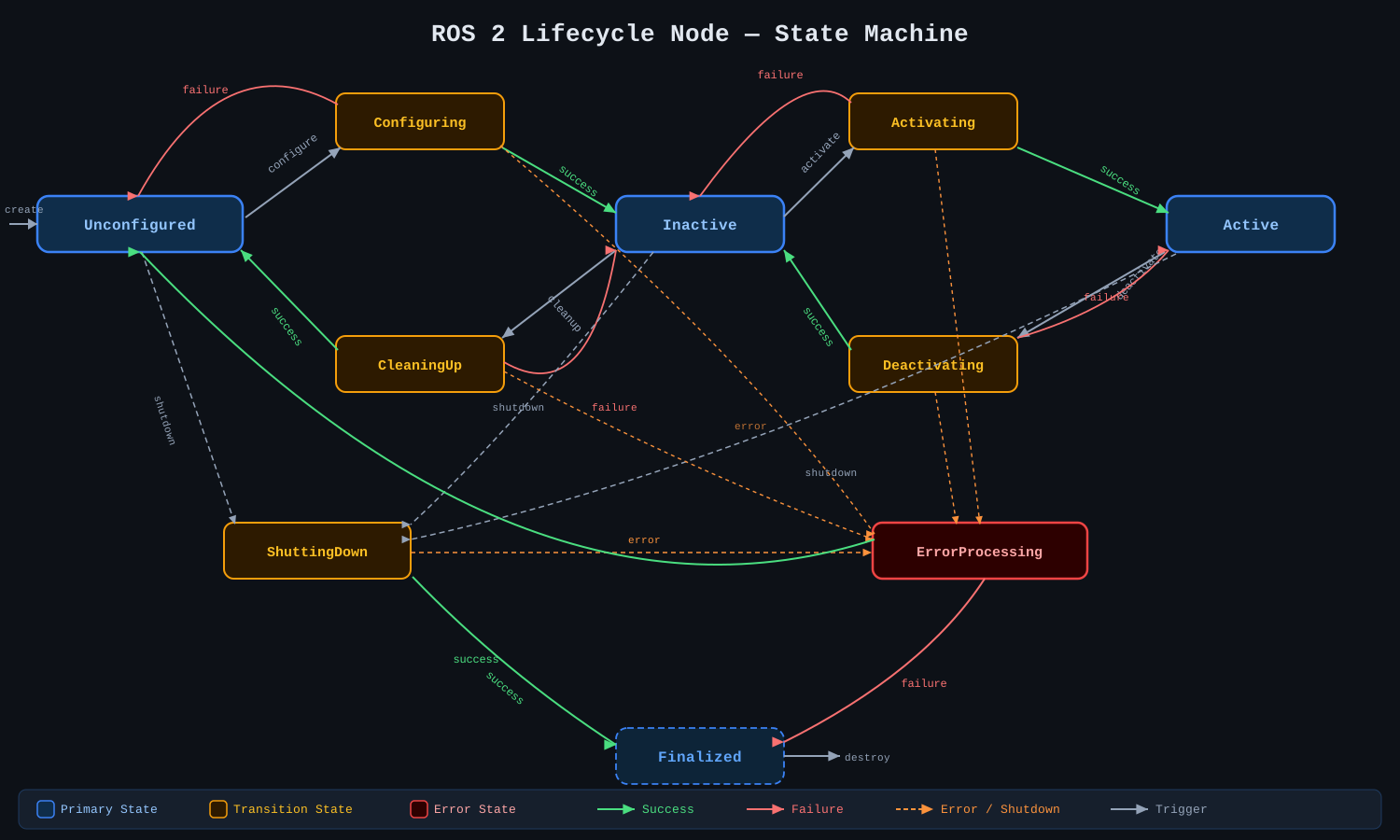
On the practical side, I use my own ldrobot-lidar-ros2 driver as a concrete example of why this makes sense for hardware. I’ve found that being able to stop a LiDAR motor without actually closing the serial port, or reconfiguring the driver settings without destroying and recreating the entire node, is a massive time-saver when I’m out in the field.
I also spent a good chunk of the guide talking about Nav2’s Lifecycle Manager. More importantly, I explain why the Nav2 team felt the need to introduce their own nav2_util::LifecycleNode wrapper. I personally think the bond mechanism they added is a life-saver. If you’ve ever had your navigation stack silently fall apart because a depth camera node crashed and none of the other nodes noticed, you’ll appreciate why bonds are so important for safety-critical tasks.
I’m also continuing my new tradition of adding a “Test Your Knowledge” section at the end. I’ve put together seven multiple-choice questions, and I’ll warn you now: some of them have more than one correct answer. I put a particular amount of care into the question about on_activate(); let’s just say that one was inspired by a very long, very painful debugging session I had on MyzharBot a few years back! 😅
I really hope this tutorial helps you build more robust robots.
Happy robotics programming! 🤖