Introduction
If you have been writing ROS 2 nodes for a while, you have probably run into this scenario: you start a sensor driver node, but the hardware is not ready yet. The node crashes, or worse, it silently starts publishing garbage. You add a sleep at the beginning of main(), cross your fingers, and ship. Sound familiar?
Or maybe you have a system with ten nodes that all need to be configured before any of them starts processing data. Without coordination, the first node to spin up starts publishing to topics that nobody is listening to yet, actions fail because servers are not ready, and the whole thing collapses in a confusing heap of error messages.
The ROS 2 lifecycle node (also called a managed node) was designed precisely for these situations. Instead of a node being either “running” or “dead”, a lifecycle node exposes a well-defined state machine. An external supervisor, a launch file, or another node can drive it through that state machine in a controlled, deterministic order. The node only starts publishing when told to activate. It can be safely deactivated, reconfigured, and re-activated without being destroyed. Errors in individual transition callbacks are isolated and handled without taking down the whole process.
This is not just a nice-to-have. In production robotics, where you have hardware that must be initialized in a specific order, where a robot must start up safely even when some sensors are not yet available, lifecycle nodes are the right tool. They are also the foundation of the entire Nav2 stack, as we will see later.
By the end of this tutorial you will be able to:
- Understand why lifecycle nodes exist and what problem they solve.
- Read and explain the lifecycle state machine diagram: primary states, transition states, all transitions.
- Implement the required callbacks in a C++ lifecycle node.
- Use the
ros2 lifecycleCLI to manage a running lifecycle node. - Understand how Nav2’s Lifecycle Manager orchestrates multiple lifecycle nodes and why the
bondmechanism was added. - Recognize lifecycle nodes in a real project (ldrobot-lidar-ros2).
Prerequisites
- ROS 2 installed, follow my Installing ROS 2 tutorial if needed.
- Familiarity with ROS 2 nodes, review Starting ROS 2 Nodes.
- Familiarity with ROS 2 Node Composition, review ROS 2 Node Composition Explained.
-
Basic C++ knowledge, lifecycle nodes are written in C++ (
rclcpp_lifecycle).
The Problem With Unmanaged Nodes
A regular ROS 2 node (rclcpp::Node) has no notion of “not ready”. The moment rclcpp::spin() is called, the node is live: timers fire, subscribers receive messages, publishers push data. This is fine for simple tools, but breaks down quickly in complex systems:
- Hardware drivers may need to open a serial port, negotiate a baud rate, and receive a firmware handshake before publishing anything meaningful. With a plain node you either block in the constructor (bad) or publish garbage until the hardware responds (worse).
- Multi-node systems often need nodes to be configured in a specific order. Node A must finish reading calibration data before Node B starts consuming it. There is no clean mechanism for this with plain nodes without writing custom synchronization logic.
- Error recovery is ad-hoc. If initialization fails, you either throw an exception (killing the process) or set a flag and skip everything (publishing nothing, confusing the rest of the system).
- Dynamic reconfiguration is fragile. Stopping a plain node to change a parameter means destroying it and recreating it, losing all subscriptions and state.
Lifecycle nodes solve all of this by giving every node a formal state machine that any external entity can inspect and drive.
The Lifecycle State Machine
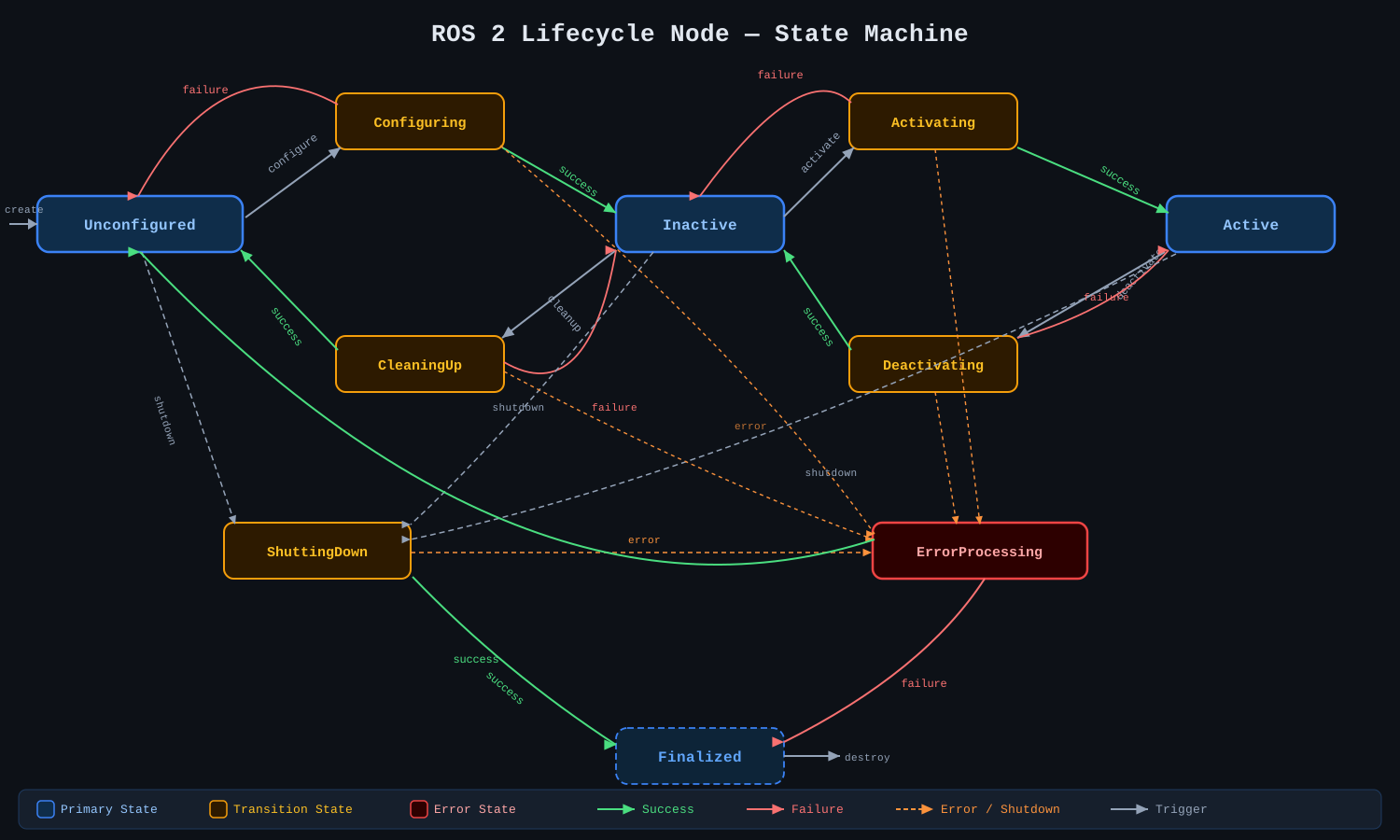
The lifecycle state machine has two categories of states: primary states and transition states.
Primary states are stable. A node sits in a primary state until an external trigger requests a transition. Nothing happens automatically.
Transition states are transient. When a transition is triggered, the node enters a transition state, executes the corresponding callback, and then moves to the next primary state depending on whether the callback succeeded or failed.
Click on the diagram below to expand it for a closer look:
Primary States
There are four primary states:
| State | Description |
|---|---|
| Unconfigured | Initial state after the node is created. No resources are allocated, no publishers or subscribers are active. This is also where the node returns after a successful cleanup or a successful onError. |
| Inactive | The node exists and its interface is configured (parameters read, publishers/subscribers created), but it is not processing data. Timers are not running. This state allows reconfiguration without behavioral changes. |
| Active | The node is fully operational. Timers fire, callbacks execute, data flows. This is where the node spends most of its life. |
| Finalized | Terminal state. The node is about to be destroyed. Useful for post-mortem inspection and debugging. |
Transition States
There are six transition states. They are intermediate: the node enters them, runs a callback, and exits to a primary state based on the result.
| State | Triggered by | Callback | Success → | Failure → |
|---|---|---|---|---|
| Configuring | configure |
onConfigure |
Inactive | Unconfigured |
| CleaningUp | cleanup |
onCleanup |
Unconfigured | Inactive |
| Activating | activate |
onActivate |
Active | Inactive |
| Deactivating | deactivate |
onDeactivate |
Inactive | Active |
| ShuttingDown | shutdown |
onShutdown |
Finalized | Finalized* |
| ErrorProcessing | error in any transition | onError |
Unconfigured | Finalized |
Note:
ShuttingDownalways leads toFinalizedregardless of callback result; the distinction is whether cleanup was clean or not.ErrorProcessingis the only state where the node can recover (back toUnconfigured) or give up (toFinalized).
Transitions Summary
Here is the complete list of externally triggerable transitions:
| Transition | From state | Target transition state |
|---|---|---|
configure |
Unconfigured | Configuring |
cleanup |
Inactive | CleaningUp |
activate |
Inactive | Activating |
deactivate |
Active | Deactivating |
shutdown |
Unconfigured / Inactive / Active | ShuttingDown |
createtransition (instantiates the node intoUnconfigured) and adestroytransition (fromFinalized), but these are handled by the process lifecycle, not by service calls.
Error Handling
Only the Active state triggers automatic ErrorProcessing when an unhandled error occurs during processing. For all other transition states, if the callback returns a failure result (not an exception), the node moves to the appropriate failure destination listed in the table above. If an exception is thrown during a transition, it is treated as a failure.
The onError callback is special: it may be called from any transition state. This means it must be written defensively; it cannot assume what resources were allocated, because the error may have happened at any point during Configuring, Activating, or any other transition.
Services Exposed by a Lifecycle Node
Every lifecycle node automatically exposes a set of ROS 2 services that can be called to trigger transitions. Given a node named /my_node, the services are:
| Service | Type | Purpose |
|---|---|---|
/my_node/change_state |
lifecycle_msgs/srv/ChangeState |
Trigger a transition |
/my_node/get_state |
lifecycle_msgs/srv/GetState |
Query current state |
/my_node/get_available_states |
lifecycle_msgs/srv/GetAvailableStates |
List all states |
/my_node/get_available_transitions |
lifecycle_msgs/srv/GetAvailableTransitions |
List valid transitions from current state |
There is also a latched topic /my_node/transition_event of type lifecycle_msgs/msg/TransitionEvent that publishes every state change. This is how a supervisor monitors the node without polling.
Implementing a Lifecycle Node in C++
The implementation uses the rclcpp_lifecycle package. Add it to your package.xml:
<depend>rclcpp_lifecycle</depend>
<depend>rclcpp_components</depend>
And to your CMakeLists.txt:
find_package(rclcpp_lifecycle REQUIRED)
find_package(rclcpp_components REQUIRED)
ament_target_dependencies(my_node rclcpp rclcpp_lifecycle rclcpp_components ...)
rclcpp_components_register_node(my_node PLUGIN "MyLifecycleNode" EXECUTABLE my_lifecycle_node)
Minimal skeleton
#include "rclcpp/rclcpp.hpp"
#include "rclcpp_lifecycle/lifecycle_node.hpp"
#include "rclcpp_components/register_node_macro.hpp"

using CallbackReturn = rclcpp_lifecycle::node_interfaces::LifecycleNodeInterface::CallbackReturn;

class MyLifecycleNode : public rclcpp_lifecycle::LifecycleNode
{
public:
  explicit MyLifecycleNode(const rclcpp::NodeOptions & options)
  : rclcpp_lifecycle::LifecycleNode("my_node", options)
  {}

  // Called on configure transition
  CallbackReturn on_configure(const rclcpp_lifecycle::State &) override
  {
    RCLCPP_INFO(get_logger(), "Configuring...");
    // allocate resources: create publishers, subscribers, read parameters
    return CallbackReturn::SUCCESS;
  }

  // Called on activate transition
  CallbackReturn on_activate(const rclcpp_lifecycle::State &) override
  {
    RCLCPP_INFO(get_logger(), "Activating...");
    // start timers, activate publishers
    return CallbackReturn::SUCCESS;
  }

  // Called on deactivate transition
  CallbackReturn on_deactivate(const rclcpp_lifecycle::State &) override
  {
    RCLCPP_INFO(get_logger(), "Deactivating...");
    // stop timers, deactivate publishers
    return CallbackReturn::SUCCESS;
  }

  // Called on cleanup transition
  CallbackReturn on_cleanup(const rclcpp_lifecycle::State &) override
  {
    RCLCPP_INFO(get_logger(), "Cleaning up...");
    // release all resources allocated in on_configure
    return CallbackReturn::SUCCESS;
  }

  // Called on shutdown transition
  CallbackReturn on_shutdown(const rclcpp_lifecycle::State &) override
  {
    RCLCPP_INFO(get_logger(), "Shutting down...");
    return CallbackReturn::SUCCESS;
  }

  // Called when any transition callback returns FAILURE or throws
  CallbackReturn on_error(const rclcpp_lifecycle::State &) override
  {
    RCLCPP_ERROR(get_logger(), "Error! Attempting recovery...");
    // clean up whatever was partially done
    return CallbackReturn::SUCCESS;  // SUCCESS → Unconfigured; FAILURE → Finalized
  }
};

RCLCPP_COMPONENTS_REGISTER_NODE(MyLifecycleNode)
CallbackReturnhas three values:SUCCESS,FAILURE, andERROR.FAILUREis a “soft” failure that keeps the node alive (going back to the previous primary state);ERRORimmediately triggersErrorProcessing.
Lifecycle publishers
When a node is Inactive, publishers should not send data. rclcpp_lifecycle provides a LifecyclePublisher that automatically respects this: calling publish() on an inactive lifecycle publisher is a no-op.
// In on_configure:
pub_ = this->create_lifecycle_publisher<std_msgs::msg::String>("chatter", 10);

// In on_activate:
pub_->on_activate();

// In on_deactivate:
pub_->on_deactivate();
Tip: Always call
on_activate()/on_deactivate()on lifecycle publishers fromon_activate()/on_deactivate()respectively. The base class does not do this automatically.
True story: I have genuinely lost hours debugging a lifecycle node that refused to publish anything, checking QoS profiles, subscriber graphs, DDS configuration, you name it. The culprit every single time? I forgot to call
pub_->on_activate()inon_activate(). The node wasActive, the publisher existed, andpublish()was being called; it just silently dropped every message. Learn from my pain.
Managing Lifecycle Nodes with the CLI
The ros2 lifecycle command is the quickest way to interact with lifecycle nodes manually.
Get the current state
ros2 lifecycle get /my_node
Output example:
unconfigured [1]
List available transitions
ros2 lifecycle list /my_node
Output:
- configure [1]
  Start: unconfigured [1]
  Goal: configuring [10]
Trigger a transition
# Configure the node
ros2 lifecycle set /my_node configure

# Activate it
ros2 lifecycle set /my_node activate

# Deactivate
ros2 lifecycle set /my_node deactivate

# Cleanup (back to Unconfigured)
ros2 lifecycle set /my_node cleanup

# Shutdown
ros2 lifecycle set /my_node shutdown
Watch state transitions in real time
ros2 topic echo /my_node/transition_event
This echoes every TransitionEvent message, so you can see exactly when the node changes state and whether transitions succeed or fail. Very handy for debugging.
Managing Lifecycle Nodes with the GUI: rqt_lifecycle_manager
The CLI is fine for poking at a single node, but it does not scale once your robot has several lifecycle nodes running at once. Typing ros2 lifecycle get and ros2 lifecycle set for each one, then re-checking with list to see what is valid next, gets old fast. This is where a GUI helps: rqt_lifecycle_manager, an rqt plugin by ajtudela, gives you exactly that.
The plugin auto-discovers every lifecycle node on the ROS graph, by looking for nodes exposing a ~/get_state service, lists them in a panel, and shows the current state of the selected node with color coding. For the selected node, it exposes buttons for every transition that is valid from its current state, configure, activate, deactivate, cleanup, shutdown, and clicking one triggers that transition immediately; only the transitions actually valid from the current state are shown, so you cannot request an illegal one by mistake. All service calls are asynchronous, so the interface stays responsive even if a node is slow to respond.
Installing it
A binary package is available for recent distros:
sudo apt install ros-${ROS_DISTRO}-rqt-lifecycle-manager
If it is not available for your distro yet, build it from source:
cd ~/ros2_ws/src
git clone https://github.com/ajtudela/rqt_lifecycle_manager.git
cd ~/ros2_ws
rosdep install -i --from-path src --rosdistro ${ROS_DISTRO} -y
colcon build --symlink-install --packages-select rqt_lifecycle_manager
source install/local_setup.bash
Launching it
You can either open plain rqt and pick the plugin from the menu, or run it as a standalone window.
# Option 1: through the rqt plugin menu
rqt
# then: Plugins -> Lifecycle -> Lifecycle Manager

# Option 2: standalone window
ros2 run rqt_lifecycle_manager rqt_lifecycle_manager
Seeing it in action
To see it manage more than one node at once, I brought up three lifecycle nodes together: my own LD Lidar ROS 2 Driver (ldlidar_node), my own YALIO lidar-odometry component (yalio), built as a nav2_util::LifecycleNode, and SLAM Toolbox (slam_toolbox), the well known mapping and localization package by Steve Macenski, the father of Nav2.
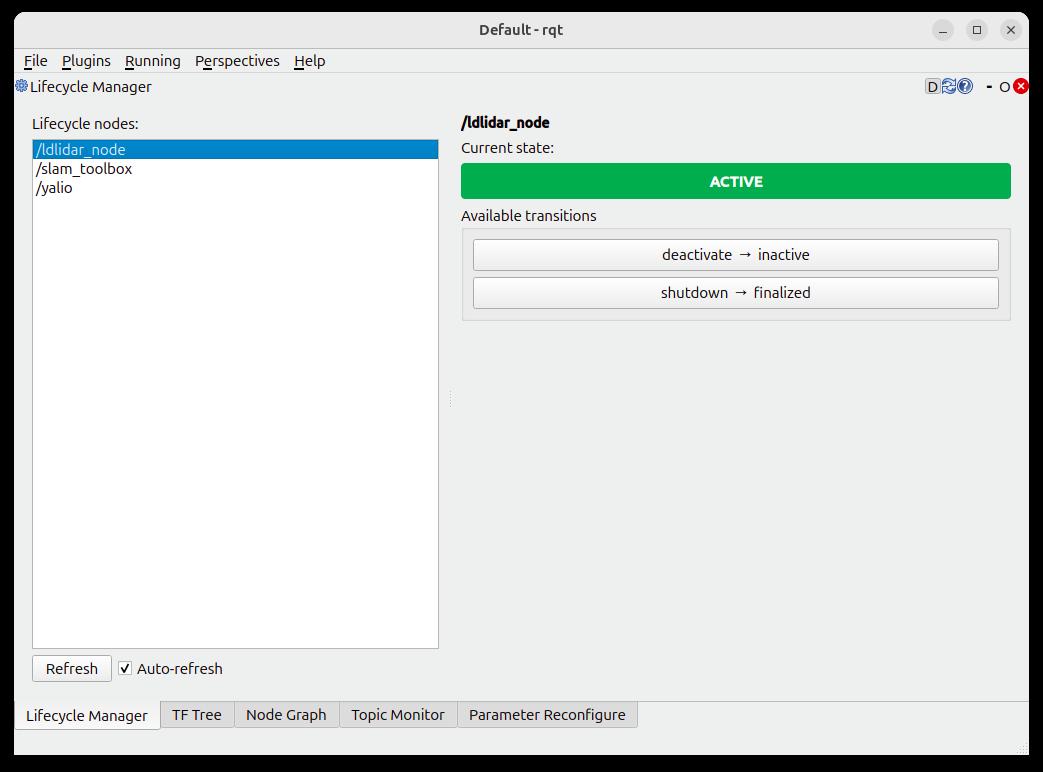
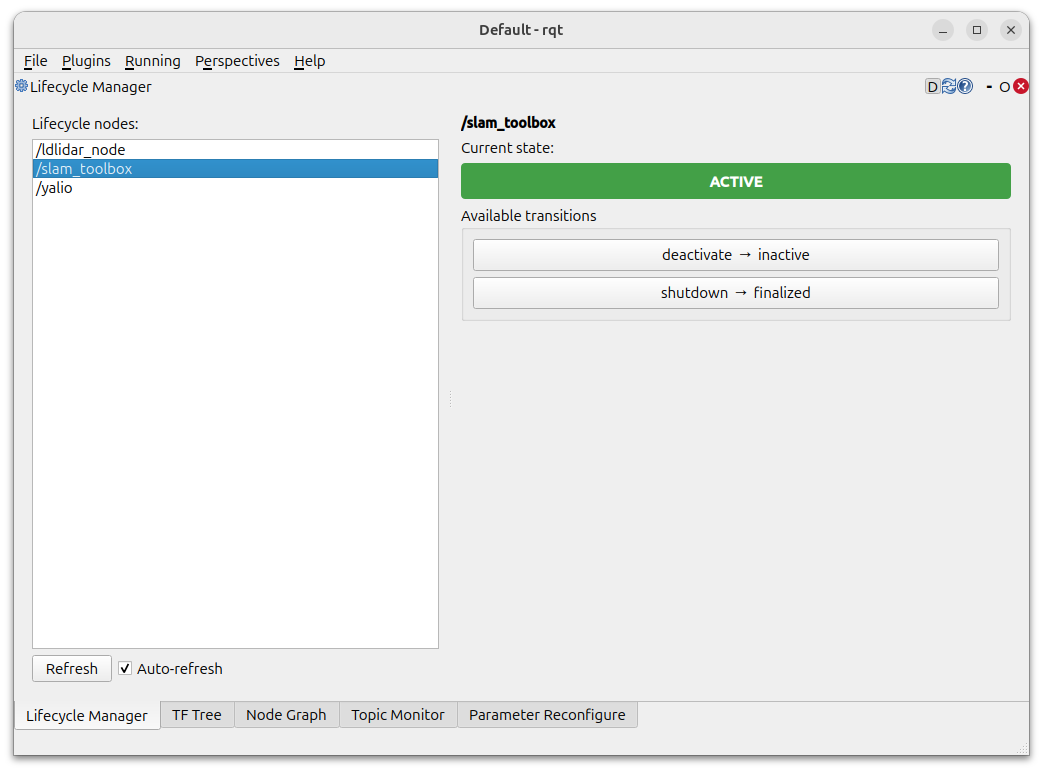
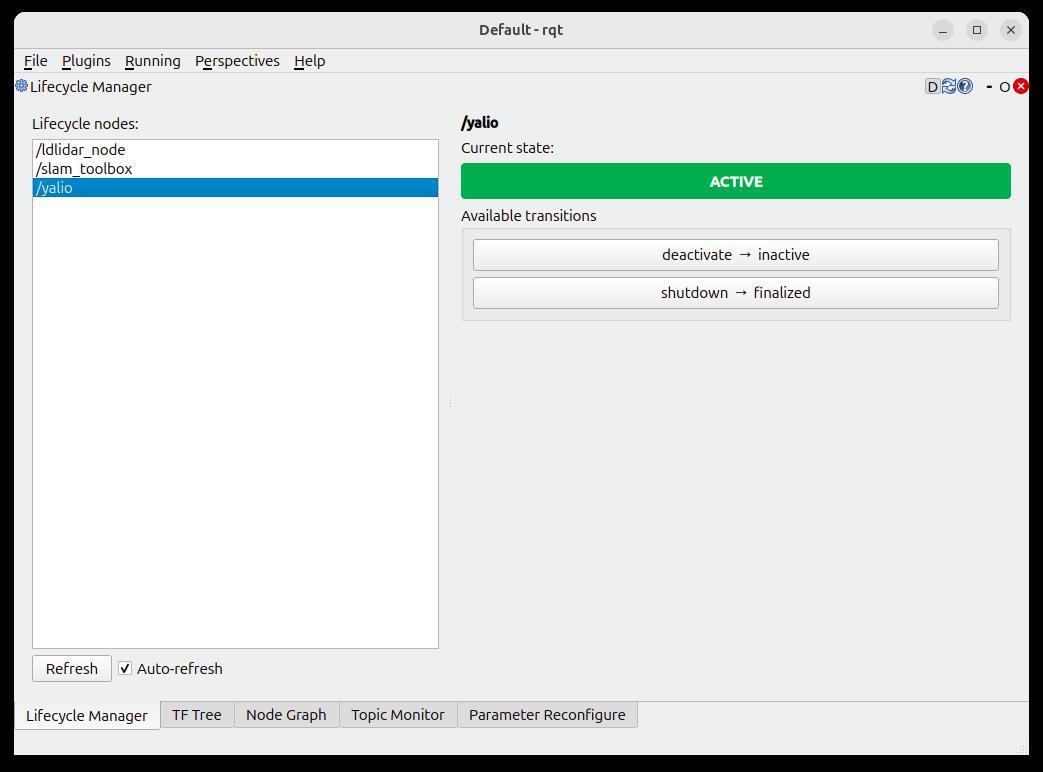
Selecting each node in the left panel updates the state indicator and the transition buttons on the right; there is no need to remember service names or type them into a terminal. For a handful of nodes on a single robot, this is a much faster feedback loop than the CLI, and it is a good complement to the Nav2 Lifecycle Manager described below, which handles the bring-up/tear-down policy automatically, while rqt_lifecycle_manager gives you visibility and manual control when you need it.
A Real-World Example: LD Lidar ROS 2 Driver
I maintain the ldrobot-lidar-ros2 GitHub repository, which provides ROS 2 support for the LDRobot LD-series LiDAR sensors. Hardware drivers are one of the canonical use cases for lifecycle nodes, and this project is a good example of why.
You can find all the details about the LD Lidar ROS 2 Driver in the ROS 2 Project section of the website.
The LiDAR driver must:
-
Configure: open the serial port, read device parameters, create the
/scanpublisher. -
Activate: begin streaming laser data, start publishing
/scanmessages. - Deactivate: stop publishing, but keep the serial port open.
- Cleanup: close the serial port, release all OS resources.
With a plain node, you have no clean way to reconfigure the sensor without destroying the node. With a lifecycle node, a supervisor can call deactivate to clean up the configuration safely and activate again to restart it, without reinitializing the serial connection. This is exactly the pattern used in the driver.
The driver exposes the standard lifecycle services, so Nav2 or any other lifecycle manager can control it in the same way it controls any other lifecycle node in the stack. No custom integration code needed.
See the project page for the full source, launch files, and usage instructions.
Orchestrating Multiple Lifecycle Nodes: Nav2 Lifecycle Manager
In a complex system like a mobile robot navigation stack, you typically have many lifecycle nodes that must be brought up and down in a specific order. Doing this by hand with ros2 lifecycle set is impractical and error-prone.
Nav2 solves this with its Lifecycle Manager (nav2_lifecycle_manager). It takes a list of node names and brings them up through configure → activate in order, and brings them down in the reverse order on shutdown.
lifecycle_manager:
  ros__parameters:
    autostart: true
    node_names:
      - map_server
      - amcl
      - controller_server
      - planner_server
      - bt_navigator
With autostart: true, the Lifecycle Manager automatically calls configure and activate on each node when the system starts. On shutdown it calls deactivate → cleanup → shutdown in reverse order, ensuring a clean teardown.
Why a custom Lifecycle base class was added to Nav2
The standard rclcpp_lifecycle::LifecycleNode is correct but minimal. Nav2 added an additional feature that the base ROS 2 lifecycle implementation does not provide: bonds.
A bond is a bidirectional heartbeat connection between the Lifecycle Manager and each Nav2 managed node. The Lifecycle Manager monitors the bond; if a managed node crashes or becomes unresponsive, the bond breaks. When a bond breaks, the Lifecycle Manager automatically transitions all managed nodes down to a safe state.
This matters enormously in a navigation stack. Imagine amcl (localization) crashes silently. Without bonds, bt_navigator keeps running, sending velocity commands to a robot that no longer knows where it is. With bonds, the broken amcl bond immediately triggers a coordinated shutdown of the whole stack.
The key configuration parameters for the bond mechanism are:
| Parameter | Default | Description |
|---|---|---|
bond_timeout |
4.0 s |
Time after last heartbeat before the bond is considered broken |
bond_heartbeat_period |
0.25 s |
How often the manager publishes heartbeats |
attempt_respawn_reconnection |
true |
Try to reconnect if a node was respawned (e.g., by a process manager) |
bond_respawn_max_duration |
10.0 s |
How long to wait for a respawned node before giving up |
nav2_util::LifecycleNodeinstead ofrclcpp_lifecycle::LifecycleNode. The Nav2 variant adds the bond mechanism automatically and integrates with the Lifecycle Manager out of the box.#include "nav2_util/lifecycle_node.hpp" class MyNav2Node : public nav2_util::LifecycleNode { public: MyNav2Node() : nav2_util::LifecycleNode("my_nav2_node") {} // ... same callbacks as before ... };The Nav2
LifecycleNodehandles all the bond setup and teardown internally. From your callback perspective it is identical to the standard lifecycle > node; you just get crash detection for free.
Lifecycle Nodes in Launch Files
You can trigger lifecycle transitions from a ROS 2 Python launch file using EmitEvent and ChangeNodeLifecycleState:
from launch import LaunchDescription
from launch_ros.actions import LifecycleNode
from launch_ros.event_handlers import OnStateTransition
from launch_ros.events.lifecycle import ChangeState
from lifecycle_msgs.msg import Transition
from launch.actions import EmitEvent, RegisterEventHandler

def generate_launch_description():
    my_node = LifecycleNode(
        package='my_package',
        executable='my_lifecycle_node',
        name='my_node',
        namespace='',
        output='screen',
    )

    # After the node becomes 'inactive', activate it
    activate_handler = RegisterEventHandler(
        OnStateTransition(
            target_lifecycle_node=my_node,
            goal_state='inactive',
            entities=[
                EmitEvent(event=ChangeState(
                    lifecycle_node_matcher=launch_ros.events.lifecycle.matches_node_name(
                        node_name='my_node'
                    ),
                    transition_id=Transition.TRANSITION_ACTIVATE,
                )),
            ],
        )
    )

    # Configure immediately at startup
    configure_event = EmitEvent(
        event=ChangeState(
            lifecycle_node_matcher=launch_ros.events.lifecycle.matches_node_name(
                node_name='my_node'
            ),
            transition_id=Transition.TRANSITION_CONFIGURE,
        )
    )

    return LaunchDescription([
        my_node,
        configure_event,
        activate_handler,
    ])
This pattern, configure at startup, then activate once inactive, is the standard way to bring up a lifecycle node from a launch file without an external manager.
EmitEventchains. The event-chain approach is useful for small setups or when you need fine-grained control over the startup sequence.
Lifecycle Nodes vs. Plain Nodes: When to Use Each
| Scenario | Use lifecycle node? |
|---|---|
| Hardware driver (camera, LiDAR, IMU) | Yes, clean init/deinit |
| Sensor fusion or processing pipeline | Yes, start only when all inputs are ready |
| Simple CLI tool or one-shot script | No, overkill |
| Navigation stack node | Yes, mandatory for Nav2 integration |
| Debugging helper, data logger | No, usually simpler without lifecycle |
| Any node controlled by Nav2 | Yes, required |
A useful heuristic: if a node controls hardware, must start in a specific order relative to other nodes, or must be gracefully stopped and restarted at runtime, make it a lifecycle node.
Conclusions
Lifecycle nodes are one of those features that feel like unnecessary complexity until the day you really need them. After that day, you cannot imagine going back to unmanaged nodes for any serious hardware or multi-node system.
The key takeaways:
-
4 primary states:
Unconfigured,Inactive,Active,Finalized. -
6 transition states:
Configuring,CleaningUp,Activating,Deactivating,ShuttingDown,ErrorProcessing. - Transitions are triggered externally (via service call or CLI); the node’s callbacks determine success or failure.
-
rclcpp_lifecyclegives you lifecycle publishers that automatically go silent when the node isInactive. - Nav2’s Lifecycle Manager orchestrates an entire stack and adds the
bondmechanism to detect silent crashes. - Real-world hardware drivers like ldrobot-lidar-ros2 use lifecycle nodes to ensure clean hardware initialization and safe teardown.
Test your knowledge
1. Which of the following are primary states in the ROS 2 lifecycle state machine? (select all that apply)
- a) Configuring
- b) Unconfigured
- c) Active
- d) ErrorProcessing
- e) Finalized
- f) Activating
Show correct answers
b) Unconfigured, c) Active, e) Finalized
Primary states are stable: the node stays there until externally triggered. There are four in total,
Unconfigured, Inactive, Active, and Finalized. Configuring, Activating, and ErrorProcessing are transition states: the node passes through them while executing a callback and cannot remain there.
2. A lifecycle node has just been instantiated. Which transitions are valid from its initial state? (select all that apply)
- a)
activate - b)
configure - c)
cleanup - d)
shutdown - e)
deactivate
Show correct answers
b) configure, d) shutdown
The node starts in
Unconfigured. From there the only valid external triggers are configure (→ Configuring → Inactive on success) and shutdown (→ ShuttingDown → Finalized). All other transitions require the node to first reach a different primary state.
3. Your on_configure callback opens a serial port successfully but then fails to negotiate the baud rate. What should it return?
- a)
CallbackReturn::SUCCESS - b)
CallbackReturn::FAILURE - c)
CallbackReturn::ERROR - d) Throw a
std::runtime_error
Show correct answer
b) CallbackReturn::FAILURE
FAILURE is the correct soft failure: the node transitions back to Unconfigured and can be re-configured later. You must close the serial port yourself before returning; there is no automatic rollback. FAILURE does not trigger ErrorProcessing; that only happens with CallbackReturn::ERROR or an unhandled exception (c or d), which are semantically reserved for unexpected faults, not anticipated failures.
4. Which statements about rclcpp_lifecycle::LifecyclePublisher are correct? (select all that apply)
- a) Calling
publish()while the node isInactivesilently discards the message - b) It must be explicitly activated in
on_activate()viapub_->on_activate() - c) The base
LifecycleNodeclass automatically activates all lifecycle publishers - d) It behaves identically to a regular
rclcpp::Publisheronce activated - e) The recommended place to create it is in
on_configure()
Show correct answers
a) Calling publish() while the node is Inactive silently discards the message, b) It must be explicitly activated in on_activate() via pub_->on_activate(), d) It behaves identically to a regular rclcpp::Publisher once activated, e) The recommended place to create it is in on_configure()
A lifecycle publisher is state-aware:
publish() is a no-op until you call pub_->on_activate() in your on_activate callback; the base class does not do it automatically (c is wrong). Once activated it behaves like any normal publisher. Creating it in on_configure is the standard pattern since that is where all resources are allocated.
5. What happens when a bond breaks in the Nav2 Lifecycle Manager? (select all that apply)
- a) Only the crashed node is restarted
- b) The Lifecycle Manager transitions all managed nodes down to a safe state
- c) The robot continues navigating using the last known state
- d) The Lifecycle Manager may attempt to reconnect if
attempt_respawn_reconnectionistrue
Show correct answers
b) The Lifecycle Manager transitions all managed nodes down to a safe state, d) The Lifecycle Manager may attempt to reconnect if attempt_respawn_reconnection is true
When a bond breaks, the Lifecycle Manager begins a coordinated shutdown of all managed nodes, not just the crashed one, to bring the entire stack to a safe state. If
attempt_respawn_reconnection is true and the node was respawned by an external process manager, it will try to reconnect within bond_respawn_max_duration. Leaving the stack running without the failed node (c, a) is precisely the unsafe behavior bonds are designed to prevent.
6. You are writing a LiDAR driver as a lifecycle node. Which operations belong in on_configure and which in on_activate? (select all that apply)
- a) Open the serial port
- b) begin laser scanning
- c) Create the
/scanlifecycle publisher - d) Start the publishing timer
- e) Call
scan_pub_->on_activate() - f) Read device parameters from the parameter server
Show correct answers
In on_configure: a) Open the serial port, c) Create the /scan lifecycle publisher, f) Read device parameters
In on_activate: d) Start the publishing timer, e) Call scan_pub_->on_activate()
on_configure sets up the interface: open hardware connections, allocate publishers, read parameters. The node is now Inactive; nothing flows yet. on_activate starts the data flow: enable the publisher, start timers, command the hardware to begin operating.
7. Which services does a lifecycle node automatically expose? (select all that apply)
- a)
change_state - b)
get_state - c)
set_parameters - d)
get_available_transitions - e)
get_available_states - f)
restart
Show correct answers
a) change_state, b) get_state, d) get_available_transitions, e) get_available_states
Every lifecycle node exposes these four services automatically.
set_parameters (c) is a standard node service, not lifecycle-specific. There is no restart service (f); restarting is a sequence of deactivate + cleanup + configure + activate calls.
What’s next
The next tutorial of this series tackles one of the most underrated, and most frequently misunderstood, topics in ROS 2, the one behind countless “my nodes won’t talk to each other” headaches: ROS 2 QoS: Why Your Nodes Aren’t Talking (and How to Fix It).
Happy robotics programming! 