Overview
YALIO, Yet Another Lidar ICP Odometry, is a ROS 2 package that estimates a robot’s motion from consecutive 2D laser scans. It is designed for affordable sensors such as the LDRobot LD19 and LD06, turning their scan data into a useful odometry source instead of limiting it to obstacle detection.
The core of the project is a Point-to-Line Iterative Closest Point (PL-ICP) scan matcher. Unlike basic point-to-point matching, PL-ICP takes the local geometry of walls and corners into account, making it a better fit for the structured indoor environments in which small mobile robots usually operate.
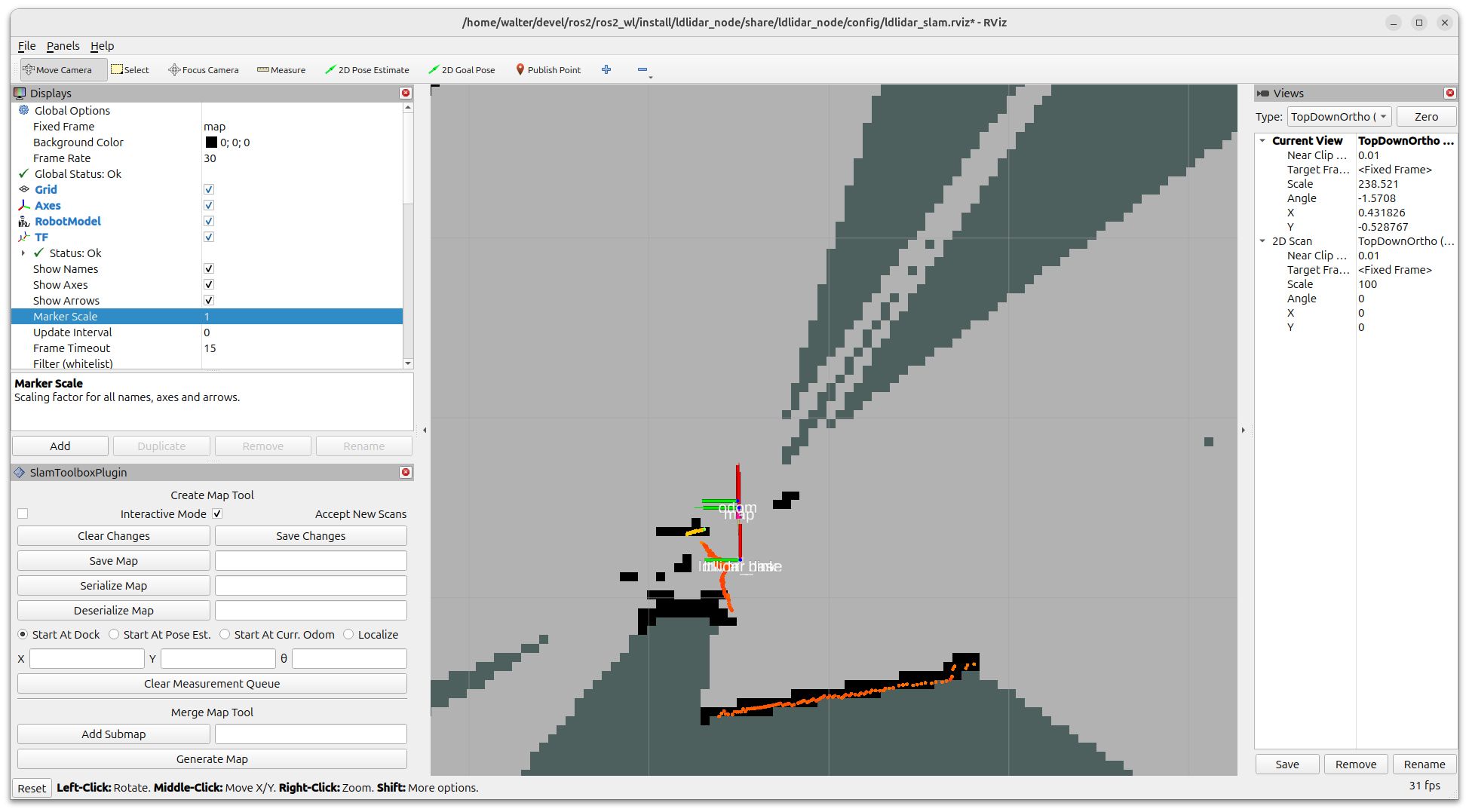
YALIO deliberately focuses on one job: estimating relative motion from lidar data. It is not a full SLAM system, so drift will accumulate over time; for global localization and mapping it can be paired with a SLAM back-end. The resulting odometry is also a practical replacement for the static or simulated motion estimates often used in early robot bring-up.
Architecture
The repository is split into three ROS 2 packages:
-
yalio_libis a pure C++ PL-ICP library with no ROS dependency. It is unit-tested with gtest and vendorsnanoflannfor nearest-neighbour searches. -
yalio_componentis anav2_util::LifecycleNodecomposable component that wraps the matcher and exposes the ROS 2 interfaces. -
yalioprovides launch files, YAML configuration, and RViz2 configuration for bringing the component up in a robot system.
Keeping the scan-matching algorithm in a standalone C++ library makes it reusable outside ROS 2 as well, including in projects with tighter embedded constraints.
The component is loaded into a multi-threaded component_container_mt, with intra-process communication enabled. The scan-processing callback can therefore run alongside lifecycle and service callbacks while its shared state is protected by a mutex. This follows the same production-oriented patterns described in my ROS 2 Lifecycle Nodes and ROS 2 Node Composition tutorials.
Lifecycle-Managed by Design
YALIO is not merely compatible with ROS 2 lifecycle nodes: lifecycle management is central to how it runs safely on a robot. The odometry component inherits from nav2_util::LifecycleNode and only subscribes to lidar scans once it has been explicitly activated. This prevents it from producing partial estimates while its parameters, TF interfaces, and internal state are still being prepared.
The lifecycle transitions map directly to useful robot-system behaviour:
-
Configure: reads the frame, preprocessing, keyframe, and ICP parameters; creates the inactive odometry publisher, TF broadcaster, and reset interfaces; then clears the matcher state. See
on_configure(). -
Activate: activates the publisher and creates the
scansubscription, so ICP processing begins only in theACTIVEstate. It also creates the Nav2 lifecycle-manager bond. Seeon_activate(). -
Deactivate: stops the scan subscription, deactivates output, and drops the manager bond without destroying configuration or reset services. See
on_deactivate(). -
Cleanup: releases ROS interfaces and resets the reference cloud and pose state, returning to
UNCONFIGURED. Seeon_cleanup().
This makes startup, shutdown, error recovery, and supervision predictable when YALIO is part of a larger Nav2 robot stack. The yalio_with_mgr.launch.py launch file hands these transitions to the Nav2 lifecycle manager, while the basic bring-up is useful when you want to inspect each transition yourself.
For the underlying concepts and their practical benefits, see my ROS 2 Lifecycle Nodes tutorial. It explains the state machine, managed publishers, and lifecycle-manager pattern that YALIO applies in a complete package.
How Point-to-Line ICP Works
For every incoming laser scan, YALIO converts valid polar range readings into a 2D point cloud and matches that cloud against a reference keyframe. The scan conversion and keyframe workflow uses the previous motion estimate as the initial guess, updates the robot pose from the resulting lidar transform, and starts a new keyframe after a configurable translation or rotation threshold.
ICP in motion
This animation shows YALIO’s Point-to-Line ICP loop for one incoming scan. The red cloud is the new scan; the blue cloud is the fixed reference keyframe. YALIO finds local reference lines, measures the red points’ distance along the green normals, estimates a correction, and repeats until the clouds align.
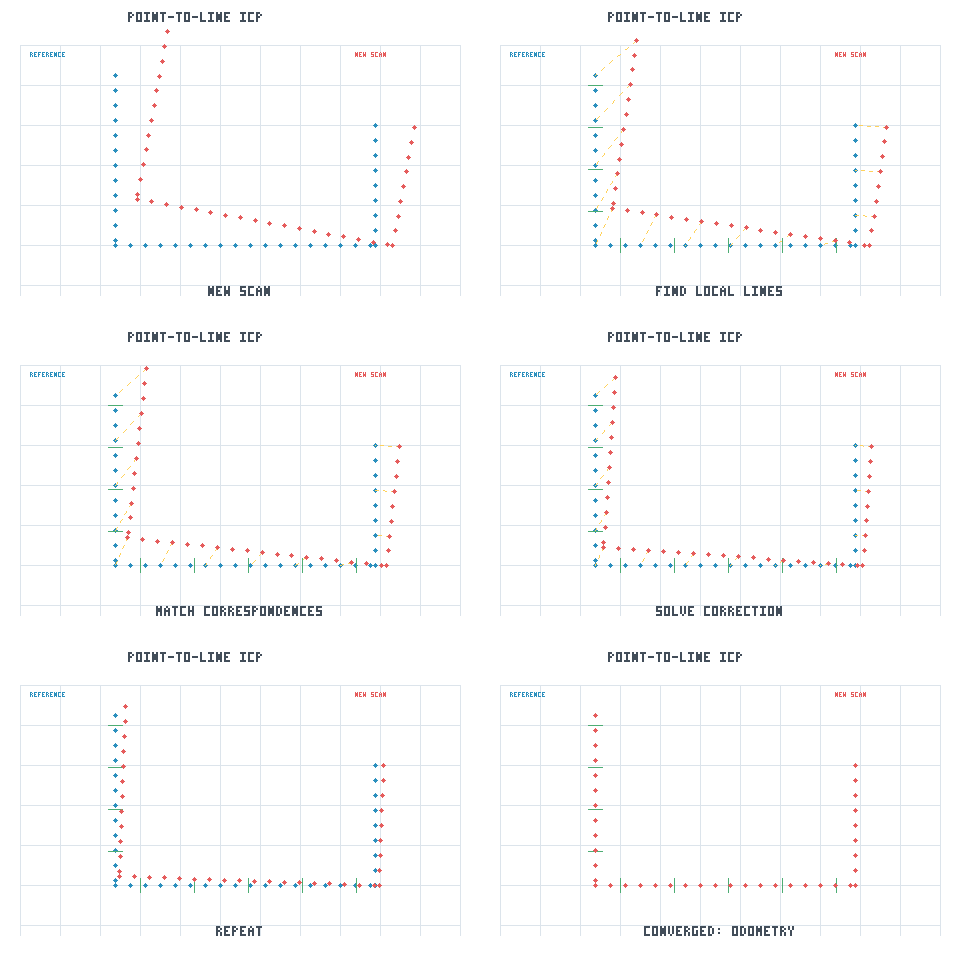
The following short video provides a broader visual introduction to the same matching loop: establish correspondences, estimate the correction, transform the source cloud, and repeat until it converges. YALIO applies this idea in 2D using point-to-line residuals rather than point-to-point distances.
Iterative Closest Point (ICP), 5 Minutes with Cyrill, by Cyrill Stachniss. It provides a visual introduction to the scan-registration loop used by YALIO.
The PL-ICP matcher repeats the following four steps until the estimated correction is smaller than the configured translation and rotation tolerances:
- Find geometric correspondences. A KD-tree finds nearby points in the fixed reference cloud. For each accepted point, YALIO fits a line to its nearest reference neighbours and uses that line’s normal rather than treating the neighbour as an isolated point. See the local-line fit and correspondence search.
-
Reject weak matches. Correspondences beyond
icp.max_corr_distare gated out; the optionalicp.trim_ratioretains only the lowest-residual matches. This reduces the impact of moving objects, scan outliers, and incorrect nearest neighbours. See gating and trimmed rejection. - Solve a small motion update. For each remaining point, the error is its signed distance along the local line normal. YALIO linearizes that error with respect to planar translation and yaw, accumulates the 3×3 normal equations, and solves them with Gauss–Newton. See the point-to-line least-squares step.
- Check convergence and quantify confidence. Once the correction is sufficiently small, the transform is accepted. The final Hessian and residual variance produce the pose covariance, so poorly constrained scenes naturally report greater uncertainty. See the convergence check and covariance estimate.
Point-to-line residuals are especially effective along walls: movement perpendicular to a wall is strongly observable from the scan, while motion along a featureless corridor is not. That limitation is real geometry rather than a failure hidden by the algorithm, which is why YALIO reports uncertainty with the odometry estimate.
Installation
Clone the repository into a ROS 2 workspace, then resolve dependencies and build it:
cd ~/ros2_ws/src
git clone https://github.com/Myzhar/yalio-ros2.git
cd ~/ros2_ws
rosdep install --from-paths src --ignore-src -r -y
colcon build --symlink-install --cmake-args=-DCMAKE_BUILD_TYPE=Release
source install/local_setup.bash
YALIO targets ROS 2 Humble and Jazzy. Its ROS dependencies, including nav2_util and nav2_lifecycle_manager, are resolved through rosdep; the nanoflann nearest-neighbour library is already included in the repository.
Launch Files and Lifecycle
The basic bring-up starts the composable component in the UNCONFIGURED lifecycle state:
ros2 launch yalio yalio_bringup.launch.py scan_topic:=/scan
It can then be configured and activated manually:
ros2 lifecycle set /yalio configure
ros2 lifecycle set /yalio activate
For normal robot operation, use the launch file with the Nav2 lifecycle manager. It automatically configures and activates YALIO and maintains a lifecycle bond:
ros2 launch yalio yalio_with_mgr.launch.py
An RViz2 launch file is also included for visual inspection of the estimate:
ros2 launch yalio yalio_rviz2.launch.py
Output and Odometry Reset
When active, YALIO publishes nav_msgs/msg/Odometry on /odom_icp and can broadcast the odom → base_link transform. The pose covariance is derived from the scan-match Hessian, while velocity is calculated from consecutive pose estimates over the scan interval.
Because a planar lidar cannot observe height, roll, or pitch, YALIO reports a large variance for those axes. This lets consumers such as a robot_localization EKF correctly ignore unobservable dimensions rather than treating them as perfectly known.
Scan-matching odometry naturally drifts over time. When an external localization source provides a known pose, or when the robot needs to restart its estimate, YALIO offers two reset interfaces:
# Reset to the origin
ros2 service call /yalio/reset_odometry std_srvs/srv/Trigger

# Set a known pose using the AMCL initialpose convention
ros2 topic pub --once /yalio/set_pose \
  geometry_msgs/msg/PoseWithCovarianceStamped \
  '{header: {frame_id: "odom"}, pose: {pose: {position: {x: 3.0, y: 1.0}, orientation: {z: 0.3827, w: 0.9239}}}}'
Both reset methods drop the current reference cloud so that the next scan starts the matching process from a clean state.
Notes
- Mount the lidar on a planar surface and configure
frames.laser_x,frames.laser_y, andframes.laser_yawto match its position on the robot. - Feature-poor or degenerate scenes, such as a single straight corridor, cannot fully constrain every motion direction. YALIO exposes that uncertainty through the estimated covariance.
- For an end-to-end example with the LD19/LD06 driver, see the
add_yalio_odometrybranch of the LD Lidar ROS 2 Driver repository.
Tests
The core PL-ICP library includes unit tests:
colcon test --packages-select yalio_lib
colcon test-result --verbose
Call to Action
Work in progress; field testing and contributions welcome: YALIO is actively being refined, particularly around error handling and parameter tuning at higher robot speeds. I would greatly appreciate tests with different robots, lidars, environments, and motion profiles. If you find an issue, have a tuning suggestion, or would like to improve the code, please open an issue or pull request on GitHub.